
GR-2 Support Page
Time table
| Order number | Shipping date | Special |
|---|---|---|
| 124762-124921 | Nov-Dec 2026 | First batch after the Kickstarter units. Deliveries slow down during Christmas! |
| 124922-125121 | Jan 2027 | |
| 125122-.. | Feb 2027 |
Firmware
10 Nov 2026: GR-2 firmware 1.8.4, release notes
24 Oct 2026: GR-2 firmware 1.8.3, release notes
14 Oct 2026: GR-2 firmware 1.8.2, release notes
Manuals
Sound packs
Frequently Asked Questions
Q: I can’t upgrade. The GR-2 doesn’t recognize the firmware file
A: Safari likes to unzip everything you download. Please hold down [Option] and then click on the link. The zip file will then remain intact. Alternatively, use another browser like Firefox.
Q: I hooked my GR-2 up to my monitors or mixer, but the output volume is really low / there’s noise?
A: Please make sure you use balanced audio cables (TRS – meaning Tip Ring Sleeve, so the phono jack has 2 black rings, not 1!). Also make sure that the knobs in the upper right are dialed all the way up. For audio input on the GR-2, use balanced gear only, or use a DI box.
Q: I’m getting jumps when I turn knobs, and making changes in one layer seems to be reflected in another layer. What’s going on?
A: Do you have Ableton connected via USB C? If so, then it defaults to feeding back MIDI data to the source. Please disable this in Ableton’s MIDI setup:
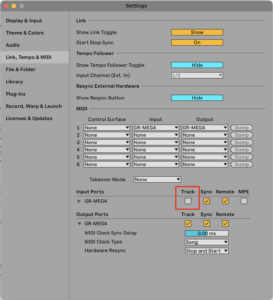
..and also make sure that you’re using the correct MIDI channels on each GR-2 layer. Layers can use the same MIDI channel. System menu → MIDI → MIDI channels
Q: Can the GR-2 import my old GR-1 patches?
A: It can do this. The scaling of some modulations do differ, though.
Q: I’m sure my MIDI controller is sending stuff to the GR-2, but it isn’t responding?
A: System menu → MPE Mode → OFF
Q: I’m loading this 1 hour long sample and granular mode does nothing. What’s up?
A: Granular mode is optimized for shorter samples. Crop the sample down to 5 minutes and 49 seconds and you should be fine.
Q: I’m using a big externally powered USB MIDI keyboard / controller, and unplugging it seems to crash my GR-2??
A: Remove the MIDI controller’s power supply. Unplug and replug your GR-2’s power to restart it. Only use an external power supply for the MIDI controller if you’re using DIN MIDI. If using USB MIDI, please let your GR-2 power the MIDI controller! This USB MIDI controller is actually misbehaving and does not conform to the USB spec. A self-powered USB device should not “backpower” a host.
Q: The display seems to have a burned-in menu screen?
A: This is temporary. The display has a memory effect, but it’s not permanent. It’s an LCD screen, not an OLED. After a minute or two it will disappear.
Q: In multitimbral – when loading a sample into one of the layers, other layers change to this sample as well! What is up?
A: By default, multitimbral presets, are references to monotimbral presets. If you don’t mind sacrificing some RAM and disk space, you can make them standalone: Menu → IO → MTPreset: detach on save → ON
Q: I have MIDI controller X and the GR-2 reacts in a strange way. How to fix this?
A: It depends a bit on the exact nature of the issue, and also on the popularity of your MIDI controller. The GR-2 adheres to the most important general MIDI CC’s, but not all. We cannot buy or borrow every MIDI controller out there, so you just have to dump MIDI data from your controller and compare it with the GR-2 CC map found in the manual. You can also send your MIDI dump to us so we can analyze.
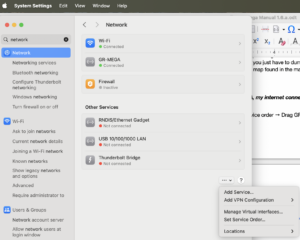
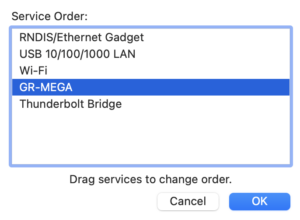
Q: When hooking up my Mac to the GR-2, my internet connection is lost. How can I fix this?
A: System Settings → Network → …⌄ → Set service order → Drag GR-2 all the way down.
Q: My GR-2 seems mute. Help!
A: The GR-2 has many volume controls and two filters. The filters can close, meaning they can mute your patch as well. Things to check:
- Check your setup. Are your monitor speakers in anti-phase?
- Is the display still showing grains? Check MIDI connectivity and MIDI settings. Try the [Play] button. Check grain rate or density knobs. Grain rate can be as low as 0.1 Hz! Grain size can also be super short!
- Check (Master) volume knob, Wet volume knob, and Patch volume controls in the MIX menu pages.
- Is the filter closed?
- Press [MIX] repeatedly until you find the layer mix page, and check the layer levels.
- Enter the effects menu [FX], and check
- the Synth send volume
- dry and wet volumes on each FX in the chain
- Amp env amount, and the Amp sustain fader! Press the [ENV] button until you find the Amp env page.